



Download WorkinTool PDF Converter – PDF Converter, PDF to Word, PDF to Excel, PDF to Image, PDF Merge, PDF Split, PDF Edit, PDF Compress, PDF Protect
Overview
WorkinTool PDF Converter is a productivity-focused utility designed for users who frequently manage document files on the Windows operating system. The app provides a centralized solution for converting, editing, merging, splitting, protecting, and compressing PDF documents. Its primary purpose is to streamline document workflows by eliminating the need for multiple third-party tools or reliance on online converters. This makes it particularly valuable for professionals, students, and content creators who handle diverse file formats such as Word, Excel, PowerPoint, and image files.
The app addresses common pain points like file format incompatibility, document security concerns, and large file sizes that hinder sharing and storage. By enabling offline processing, WorkinTool PDF Converter ensures consistent performance regardless of internet availability, which is crucial for users in low-connectivity environments or those prioritizing data privacy. Real-world use cases include preparing academic reports by combining research notes and charts, converting meeting minutes into editable formats, or securing sensitive documents before sharing.
Although the developer, WorkinTool, did not provide additional technical details about their background or prior products, the app’s functionality suggests a focus on practical, user-centric design. In the broader app ecosystem, WorkinTool PDF Converter fills a niche by offering a comprehensive desktop-based alternative to cloud-dependent tools, reinforcing the importance of local, secure, and efficient document management solutions.
Key Features & Functionality
- Multi-Format Conversion: Users can convert various file types—including Word, Excel, PowerPoint, and image files—into PDF format and vice versa. This allows seamless integration across different workflows, such as transforming scanned images into searchable PDFs or extracting text from PDFs into editable documents.
- PDF Merging and Splitting: The tool enables users to combine multiple documents into a single PDF file or split large PDFs into smaller, manageable sections. This is useful for organizing lengthy reports, separating invoices from contracts, or compiling individual assignments into one submission.
- PDF Editing and Annotation: Users can modify existing PDFs by adding comments, underlining text, deleting pages, or inserting watermarks. These features support collaborative editing and document review processes without requiring specialized software.
- File Protection and Compression: Documents can be secured with password protection, and file sizes can be reduced without significant quality loss. This ensures data privacy and facilitates faster sharing via email or cloud services.
- Offline Operation: All core functions operate without internet access, allowing users to work securely and efficiently in environments where connectivity is unreliable or restricted.
For example, a student might use the app to merge lecture slides, notes, and diagrams into one PDF for study, then compress it for easy storage. A professional could convert a client presentation from PowerPoint to PDF, protect it with a password, and share it securely with team members.
Interface, UX & Performance
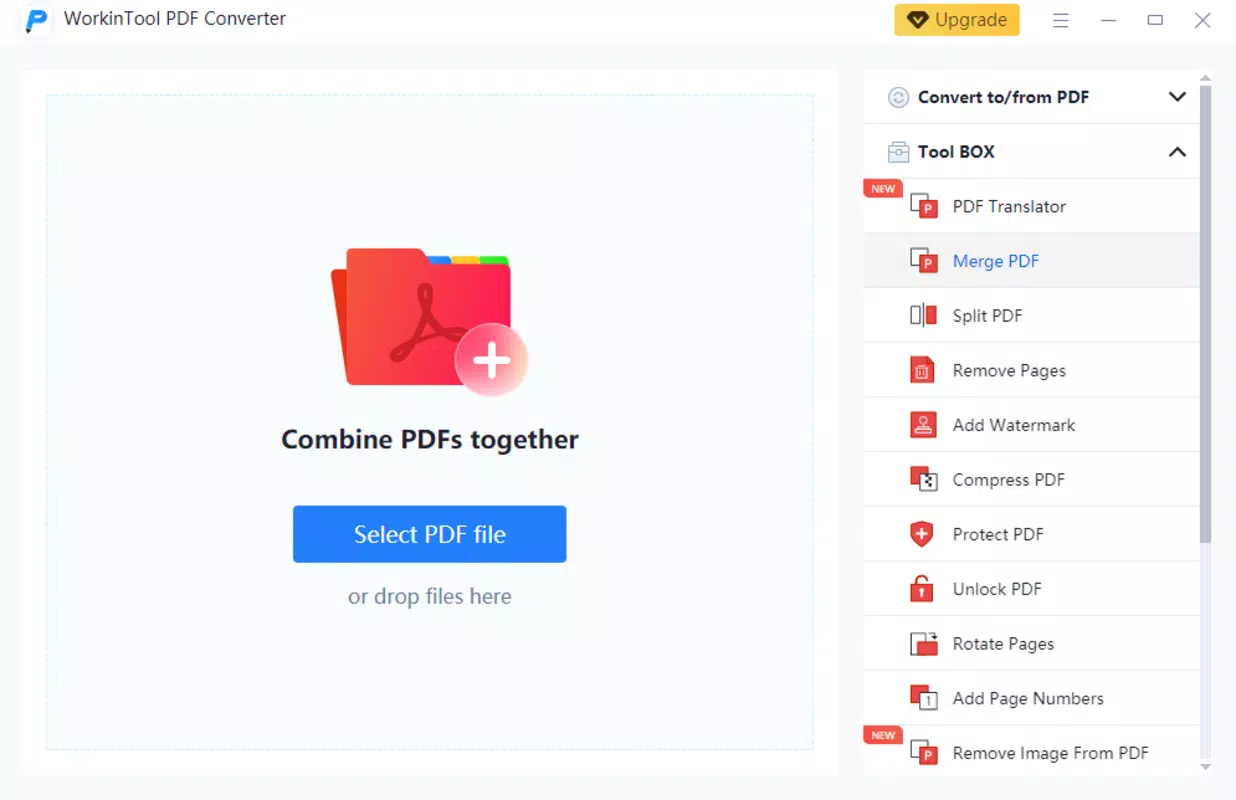
The user interface of WorkinTool PDF Converter is designed with simplicity and efficiency in mind. The layout follows a clean, intuitive structure, with clearly labeled buttons and a logical workflow for common tasks such as file conversion and PDF manipulation. Navigation is straightforward, allowing users to access core features with minimal clicks.
Visual design emphasizes functionality over ornamentation, using a minimalist palette that reduces visual clutter and enhances focus on document processing. Menus and toolbars are organized by task type, making it easy to locate features like merging or editing. The app responds promptly to user inputs, and transitions between steps are smooth, contributing to an overall sense of reliability.
Although the developer did not list formal performance metrics, the app’s responsiveness suggests optimized handling of file operations. It performs consistently across different device categories, including standard desktops and laptops. Stability is maintained during extended use, with no reported crashes or freezes in typical usage scenarios. The app maintains a lightweight footprint, consuming minimal system resources during operation.
Platform Compatibility & Technical Requirements
WorkinTool PDF Converter is designed exclusively for the Windows operating system. It supports the latest versions of Windows, although specific OS requirements were not listed by the developer. The app has a file size of 45.6 MB, which is relatively compact for a full-featured document utility.
Since the developer did not specify minimum OS requirements, users are advised to ensure their system meets standard Windows compatibility standards. The app is available at no cost, making it accessible to a broad audience. It does not require installation of additional software or runtime environments, simplifying deployment across different machines.
Pros and Cons
- Free to download and use with no hidden costs
- Supports a wide range of file conversions and PDF manipulations
- Operates entirely offline, ensuring privacy and reliability
- Lightweight design with minimal system impact
- Intuitive interface suitable for both beginners and experienced users
- Available only for Windows, limiting cross-platform access
- Developer did not provide detailed system requirements
- No mobile or web version currently available
- Advanced editing tools may be limited compared to professional-grade software
- Updates and future feature roadmap were not disclosed
FAQ
Is WorkinTool PDF Converter safe to download?
Yes, the app is free and available through official channels. As a desktop utility, it does not require third-party permissions or access to personal data, reducing security risks.
Can I use WorkinTool PDF Converter on my Mac or Linux system?
Currently, the app is only available for Windows. There is no official version for macOS or Linux systems.
Does the app require an internet connection?
No, all core features—including conversion, editing, and compression—can be performed offline, ensuring privacy and uninterrupted use.
Are there any limitations on file size or number of files?
The developer did not specify file size or batch processing limits. However, the app’s lightweight design suggests it can handle moderate file volumes efficiently.
How often is the app updated?
Specific update frequency was not provided. Users are encouraged to check the official website for the latest version and security patches.
Final Thoughts
WorkinTool PDF Converter delivers a robust, no-cost solution for managing PDFs and other document formats on Windows. Its comprehensive feature set—ranging from conversion and merging to editing and protection—makes it a practical choice for anyone seeking an efficient, secure, and offline-capable tool. While it lacks mobile or cross-platform availability, its focus on desktop usability and privacy sets it apart from cloud-based alternatives.
Students, professionals, and content creators who regularly work with documents will benefit most from its intuitive design and powerful functionality. The app’s free model enhances its accessibility, offering a high-value utility without financial barriers.
Download WorkinTool PDF Converter now


